Flow Performance  LLC
FP1 version 3.17.32 and higher, supports a third pressure sensor in the FP1, pressure sensor 3, or PS3. PS3 can be used to measure flow velocities while flow volume rates are being measured on PS2.
FP1 Pressure Sensor 3 (PS3)
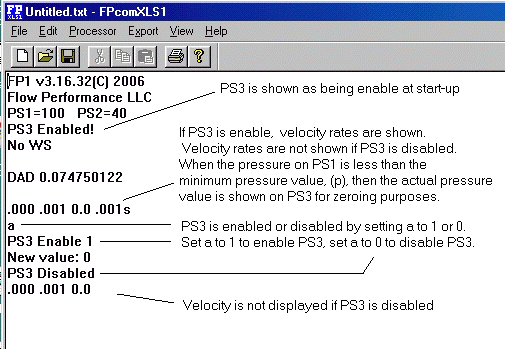
PS3 is enabled by setting (a) to 1 (one).
PS3 is disabled by setting (a) to 0 (zero).

When PS3 is enabled, the data reading rate from the FP1 is slowed. This is because of the time required to sample and process PS3.

If PS3 is disabled, make sure there is no pressure applied to all pressure sensors when enabling PS3. The FP1 will enter the zeroing function when PS3 is enabled.

v (lower case) is a trim multiple of the velocity reading. Be sure v is set to 1.0 if no adjustment is desired.

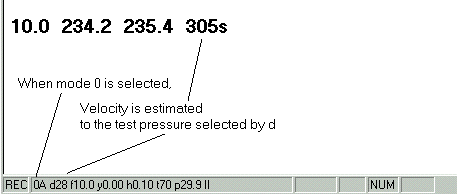
V (upper case) Determines velocity reading format. V = 1 feet per second. V = 0 feet per minute. Velocity readings in feet per second are appended with an s (Example: 240s).
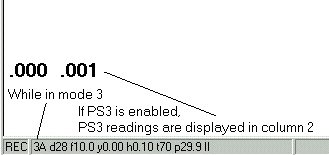
Mode 3, When PS3 is enabled in mode 3, PS3 pressure is displayed in column 2. PS2 is not displayed.
If PS3 is disabled in mode 3, PS2 pressure readings are displayed in column 2.

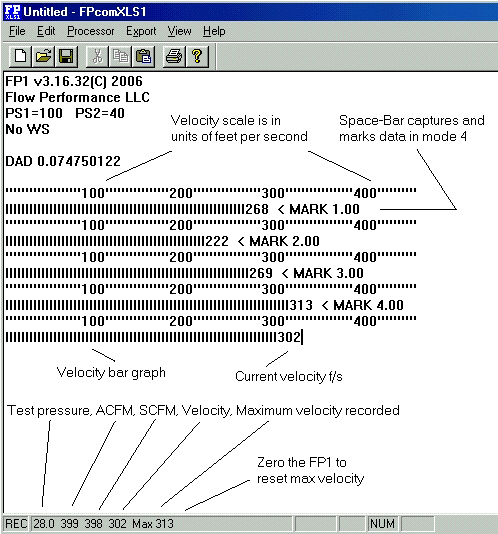
Mode 4 allows velocity bar graph image and cfm readings. Max velocity is recorded in the status bar. To reset max velocity, zero the FP1. FP1 version 3.17.32 and later feature Space-Bar data capture. Mark increments are set by (Q), and can be any value, including negative numbers for counting down.